Notice
Recent Posts
Recent Comments
Link
| 일 | 월 | 화 | 수 | 목 | 금 | 토 |
|---|---|---|---|---|---|---|
| 1 | 2 | 3 | 4 | |||
| 5 | 6 | 7 | 8 | 9 | 10 | 11 |
| 12 | 13 | 14 | 15 | 16 | 17 | 18 |
| 19 | 20 | 21 | 22 | 23 | 24 | 25 |
| 26 | 27 | 28 | 29 | 30 |
Tags
- 국제화
- 안드로이드
- 예외처리
- 메소드
- paint
- 기본
- OGNL
- 배열
- 클래스
- oracle
- 이클립스
- 메서드
- HTML
- mybatis
- 생성자
- Menu
- Java
- Eclips
- 전화걸기
- Android
- JSP
- struts2
- Spring
- AWT
- 에러페이지
- layout
- 어노테이션
- Graphic
- JavaScript
- 오버로딩
Archives
- Today
- Total
note
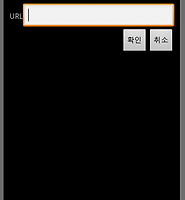
Android Table Layout 본문
<?xml version="1.0" encoding="utf-8"?>
<!--  테이블 짜기 권장방법 -->
<TableLayout xmlns:android="http://schemas.android.com/apk/res/android"
    android:layout_width="fill_parent"
    android:layout_height="fill_parent">
<TableRow>
    <TextView
        android:text="국어"
        android:textSize="30sp"
        android:padding="10dp" />
    <TextView
        android:text="영어"
        android:textSize="30sp"
        android:padding="10dp" />
    <TextView
        android:text="수학"
        android:textSize="30sp"
        android:padding="10dp" />
</TableRow>
<TableRow>
    <TextView
        android:text="88"
        android:textSize="30sp"
        android:padding="10dp" />
    <TextView
        android:text="92"
        android:textSize="30sp"
        android:padding="10dp" />
    <TextView
        android:text="76"
        android:textSize="30sp"
        android:padding="10dp" />
</TableRow>
</TableLayout>

<?xml version="1.0" encoding="utf-8"?>
<TableLayout xmlns:android="http://schemas.android.com/apk/res/android"
    android:layout_width="fill_parent"
    android:layout_height="fill_parent"
    android:stretchColumns="1" >
    <!--
    android:stretchColumns = 하나이상의 열 번호를 쉼표로 연결해서 지정 지정된
    번호의 열은 해당하는 행에서 남아 있는 공간을 없앨 수 있을 만큼 폭이 늘어남

    android:layout_column = 열번호 지정 (0번 부터 시작)

    android:layout_span = 두개 이상의 열에 걸쳐 배치할 때 열을 합쳐 표시할 때 사용

    android:shrinkColumns = 하나 이상의 열번호를 쉼표로 연결해서 지정 지정된
    열은 텍스트를 줄 내림하는 등의 방법으로 차지하는 폭을 최대한 줄인다.(기본 설정으로는
    텍스트를 줄 내림하지 않음) 일부 열의 내용이 많아져서 테이블 일부가 화면 밖으로
    밀려나갈 가능성이 있다면 지정
     -->

    <TableRow>
        <TextView
            android:text="URL:" />
        <EditText android:id="@+id/entry"
            android:layout_span="3" />
    </TableRow>
    <!-- 수평선 구현 -->
    <View
        android:layout_height="2px"
        android:background="#0000ff" />
    <TableRow>
        <Button
            android:id="@+id/cancel"
            android:layout_column="2"
            android:text="취소" />
        <Button
            android:id="@+id/ok"
            android:text="확인" />
    </TableRow>
</TableLayout>

'Android > 기본' 카테고리의 다른 글
| ListActivity 사용 (0) | 2012.01.09 |
|---|---|
| ListActivity ArrayAdapter (0) | 2012.01.09 |
| Android Frame Layout (0) | 2012.01.06 |
| Android Relative Layout (0) | 2012.01.06 |
| Android Margin Padding (0) | 2012.01.06 |
'Android/기본' Related Articles
more