Notice
Recent Posts
Recent Comments
Link
| 일 | 월 | 화 | 수 | 목 | 금 | 토 |
|---|---|---|---|---|---|---|
| 1 | ||||||
| 2 | 3 | 4 | 5 | 6 | 7 | 8 |
| 9 | 10 | 11 | 12 | 13 | 14 | 15 |
| 16 | 17 | 18 | 19 | 20 | 21 | 22 |
| 23 | 24 | 25 | 26 | 27 | 28 | 29 |
| 30 | 31 |
Tags
- 어노테이션
- oracle
- 기본
- HTML
- 생성자
- 에러페이지
- paint
- 이클립스
- OGNL
- Java
- 오버로딩
- Android
- Eclips
- 예외처리
- JavaScript
- 국제화
- 배열
- struts2
- 메서드
- 클래스
- layout
- mybatis
- Spring
- Graphic
- 전화걸기
- 메소드
- 안드로이드
- Menu
- AWT
- JSP
Archives
- Today
- Total
note
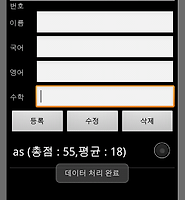
성적관리 앱2 본문

이전 버전에서 추가된 사항
파일로 저장됨(데이터)
실행시 자동 불러오기
하지만
한줄만 데이터 저장됨ㅋㅋㅋㅋ
<?xml version="1.0" encoding="utf-8"?>
<TableLayout xmlns:android="http://schemas.android.com/apk/res/android"
    android:layout_width="fill_parent"
    android:layout_height="fill_parent"
    android:stretchColumns="1" >

    <TextView android:gravity="center"
        android:id="@+id/num"
        android:layout_width="wrap_content"
        android:layout_height="wrap_content" />

    <TableRow>

        <TextView
            android:padding="10dp"
            android:text="이름 : "
            android:textSize="30sp" />

        <EditText
            android:id="@+id/name"
            android:padding="10dp"
            android:singleLine="true"
            android:hint="이름 입력" />
    </TableRow>

    <TableRow>

        <TextView
            android:padding="10dp"
            android:text="국어 : "
            android:textSize="30sp" />

        <EditText
            android:id="@+id/korean"
            android:inputType="numberDecimal"
            android:padding="10dp"
            android:singleLine="true" />
    </TableRow>

    <TableRow>

        <TextView
            android:padding="10dp"
            android:text="영어 : "
            android:textSize="30sp" />

        <EditText
            android:id="@+id/english"
            android:inputType="numberDecimal"
            android:padding="10dp"
            android:singleLine="true" />
    </TableRow>

    <TableRow>

        <TextView
            android:padding="10dp"
            android:text="수학 : "
            android:textSize="30sp" />

        <EditText
            android:id="@+id/math"
            android:inputType="numberDecimal"
            android:padding="10dp"
            android:singleLine="true" />
    </TableRow>


    <LinearLayout
        android:layout_width="fill_parent"
        android:layout_height="wrap_content"
        android:gravity="center"
        android:orientation="horizontal" >


        <Button
            android:id="@+id/add"
            android:layout_width="wrap_content"
            android:layout_height="wrap_content"
            android:text="추가"
            android:textSize="30sp" />
        <Button
            android:id="@+id/mod"
            android:layout_width="wrap_content"
            android:layout_height="wrap_content"
            android:text="수정"
            android:textSize="30sp" />
        <Button
            android:id="@+id/del"
            android:layout_width="wrap_content"
            android:layout_height="wrap_content"
            android:text="삭제"
            android:textSize="30sp" />
        </LinearLayout>
<LinearLayout
        android:layout_width="fill_parent"
        android:layout_height="fill_parent"
        android:orientation="vertical" >
        <ListView
            android:id="@android:id/list"
            android:layout_width="fill_parent"
            android:layout_height="fill_parent" />
    </LinearLayout>

</TableLayout>
package kr.vichara.grade;

import java.io.BufferedReader;
import java.io.InputStream;
import java.io.InputStreamReader;
import java.io.OutputStreamWriter;
import java.util.ArrayList;
import java.util.StringTokenizer;

import android.app.ListActivity;
import android.os.Bundle;
import android.util.Log;
import android.view.View;
import android.widget.ArrayAdapter;
import android.widget.Button;
import android.widget.EditText;
import android.widget.ListView;
import android.widget.TextView;
import android.widget.Toast;

public class Homework_grade extends ListActivity {
	private final static String NOTES = "grade.txt";
	private static final String TAG = "Grade App";
	int korean2, english2, math2, avg, sum, p, p2, mode;
	String name2, add2, avg2, korean3, english3, math3, card, str3;
	Button add, mod, del;
	EditText korean, english, math, name;
	TextView num;
	ArrayList list, list2;
	ArrayAdapter adapter;
	StringTokenizer str2;
	StringBuffer buf;

	@Override
	public void onCreate(Bundle savedInstanceState) {
		super.onCreate(savedInstanceState);
		setContentView(R.layout.main);

		// 각종 객체 생성
		num = (TextView) findViewById(R.id.num);
		korean = (EditText) findViewById(R.id.korean);
		english = (EditText) findViewById(R.id.english);
		name = (EditText) findViewById(R.id.name);
		math = (EditText) findViewById(R.id.math);
		list = new ArrayList();
		//버튼
		findViewById(R.id.add).setOnClickListener(mClickListener);
		findViewById(R.id.mod).setOnClickListener(mClickListener);
		findViewById(R.id.del).setOnClickListener(mClickListener);
		// 아답터 생성 및 싱글초이스로 하나만 선택(반대는멀티초이스)
		adapter = new ArrayAdapter(this,
				android.R.layout.simple_list_item_single_choice, list);
		getListView().setChoiceMode(ListView.CHOICE_MODE_SINGLE);
	}
	// 초기화 및 아답터 출력
	public void Clear() {
		if (name != null && korean != null && english != null && math != null) {
			name.setText("");
			korean.setText("");
			english.setText("");
			math.setText("");
		}
		// 출력
		setListAdapter(adapter);
	}

	// 토스트 메세지 추가,수정,삭제에 반응
	public void Message() {
		switch (mode) {
		case R.id.add:
			Toast.makeText(this, p + " 번에 저장 되었습니다", 4000).show();break;
		case R.id.mod:
			Toast.makeText(this, p + " 번이 수정 되었습니다", 4000).show();break;
		case R.id.del:
			Toast.makeText(this, p + " 번이 삭제 되었습니다", 4000).show();break;
		}
	}
	// 선택되어진 번호 TextView에 출력 및 인덱스 값 저장
		public void onListItemClick(ListView parent, View v, int position, long id) {
			p = position;
			num.setText("선택된 번호 : " + p + " 번");
		}
	// 추가 수정 삭제 처리
		public void Process() {
			try {
				// int
				korean2 = Integer.parseInt(korean.getText() + "");
				english2 = Integer.parseInt(english.getText() + "");
				math2 = Integer.parseInt(math.getText() + "");
				// String
				name2 = name.getText().toString();
				korean3 = Integer.toString(korean2);
				english3 = Integer.toString(english2);
				math3 = Integer.toString(math2);
				// 총합,평균
				sum = korean2 + english2 + math2;
				avg = sum / 3;
				add2 = Integer.toString(sum);
				avg2 = Integer.toString(avg);
				// 파일로 저장될 데이터
				card = (name.getText().toString() + "|" + korean3 + "|" + english3
						+ "|" + math3 + "|" + sum + "|" + avg);
			} catch (Exception e) {
				Log.e(TAG, "Process부분 오류", e);
			} finally {
				switch (mode) {
				case R.id.add:
					list.add(0, "이름 : " + name2 + "총점 : " + sum + " 평균 : " + avg);
					p2=p++;
					break;
				case R.id.mod:
					list.set(p, "이름 : " + name2 + "총점 : " + sum + " 평균 : " + avg);
					break;
				case R.id.del:
					list.remove(p);
					break;
				}
				Clear();
				//onPause();
				Message();
			}
		}

	// 버튼 선택 이벤트
	Button.OnClickListener mClickListener = new View.OnClickListener() {
		public void onClick(View v) {
			mode = v.getId();
			Process();
			// 액티비티 종료 액티비티 종료시에 Activity 생명주기에 의해서 onPause -> onStop -> onDestroy
			// finish();
		}
	};

	// 데이터 꺼내기
	public void onResume() {
		super.onResume();
		try {
			InputStream in = openFileInput(NOTES);

			if (in != null) {

				list2 = new ArrayList();
				InputStreamReader tmp = new InputStreamReader(in);
				BufferedReader reader = new BufferedReader(tmp);
				String str;
				buf = new StringBuffer();

				// 데이터 추출 String저장
				while ((str = reader.readLine()) != null) {
					buf.append(str + "\n");
				}
				in.close();

				str2 = new StringTokenizer(buf.toString(), "|");
				while (str2.hasMoreTokens()) {
					str3 = str2.nextToken();
					list2.add(str3);
				}
				// 불러오기
				list.add(0, "이름 : " + list2.get(0) + "합계 : " + list2.get(4)
						+ ", 평균 : " + list2.get(5));
				setListAdapter(adapter);
			}
		}catch(IndexOutOfBoundsException e){
			Log.e(TAG, "저장된 데이터가 없습니다", e);
			Toast.makeText(this, "저장된 데이터가 없습니다 ",2000).show();
		} catch (java.io.FileNotFoundException e) {
			Log.e(TAG, "파일을 호출할 수 없습니다.", e);
		} catch (Throwable t) {
			Log.e(TAG, "오류 발생", t);
			Toast.makeText(this, "예외 : " + t.toString(), 2000).show();
		}
	}

	// 데이터 저장
	public void onPause() {
		super.onPause();
		try {
			OutputStreamWriter out = new OutputStreamWriter(openFileOutput(
					NOTES, MODE_PRIVATE));
			// MODE_PRIVATE :덮어쓰기
			// MODE_APPEND : 이어쓰기

			// 저장
			out.write(card);
			out.close();
			//Toast.makeText(this, "데이터를 저장합니다잉~~", 4000).show();
		} catch (Throwable t) {
			Toast.makeText(this, "예외 : " + t.toString(), 2000).show();
		}
	}
}
'개발노트' 카테고리의 다른 글
| Game.DB 주소 (0) | 2012.02.02 |
|---|---|
| 성적관리3(파일 저장사용) (0) | 2012.01.18 |
| 성적 관리 앱 (0) | 2012.01.12 |
| 안드로이드 성적관리 아이콘 (0) | 2012.01.11 |
| 사칙연산 Spinner와 Radio버튼으로 하기 (0) | 2012.01.10 |
'개발노트' Related Articles
more